
Intro to AI Dungeon Scripting
Getting started with scripting in AI Dungeon
##What is AI Dungeon?
AI Dungeon is a text-based roleplaying game that allows you to create and play scenarios using AI to narrate your adventures. I’m assuming you already know what it is and how it works if you’re interested in scripting.
##What is AI Dungeon Scripting?
Scripting provides you a way to take more control over your AI Dungeon experience. In particular, you can interact in three ways:
- Read and modify player inputs
- Read and modify AI outputs
- Read and (sometimes) modify AI context
These three let you control basically your entire experience, and these are super powerful. If you’ve ever seen the (🎭IS) marker on a scenario, that’s using scripting.
Scripts range from simple to complex. LewdLeah’s Inner Self uses scripts to simulate thought in NPCs using prompt injection. LewdLeah’s Auto Cards uses scripts to automatically create story cards based on your story’s contents. PoisonTea’s Dice Roll Script uses scripting to automatically roll dice when you “try” an action.
##How do I get started?
You’ll want to know a little bit of JavaScript, or to be comfortable with vibe coding, knowing how to copy things around and test them thoroughly. There are some project setups that can help AI work more effectively with scripts, but for the purposes of this guide I’m going to keep things simple.
We’ll start in the scripting UI, which looks like this:
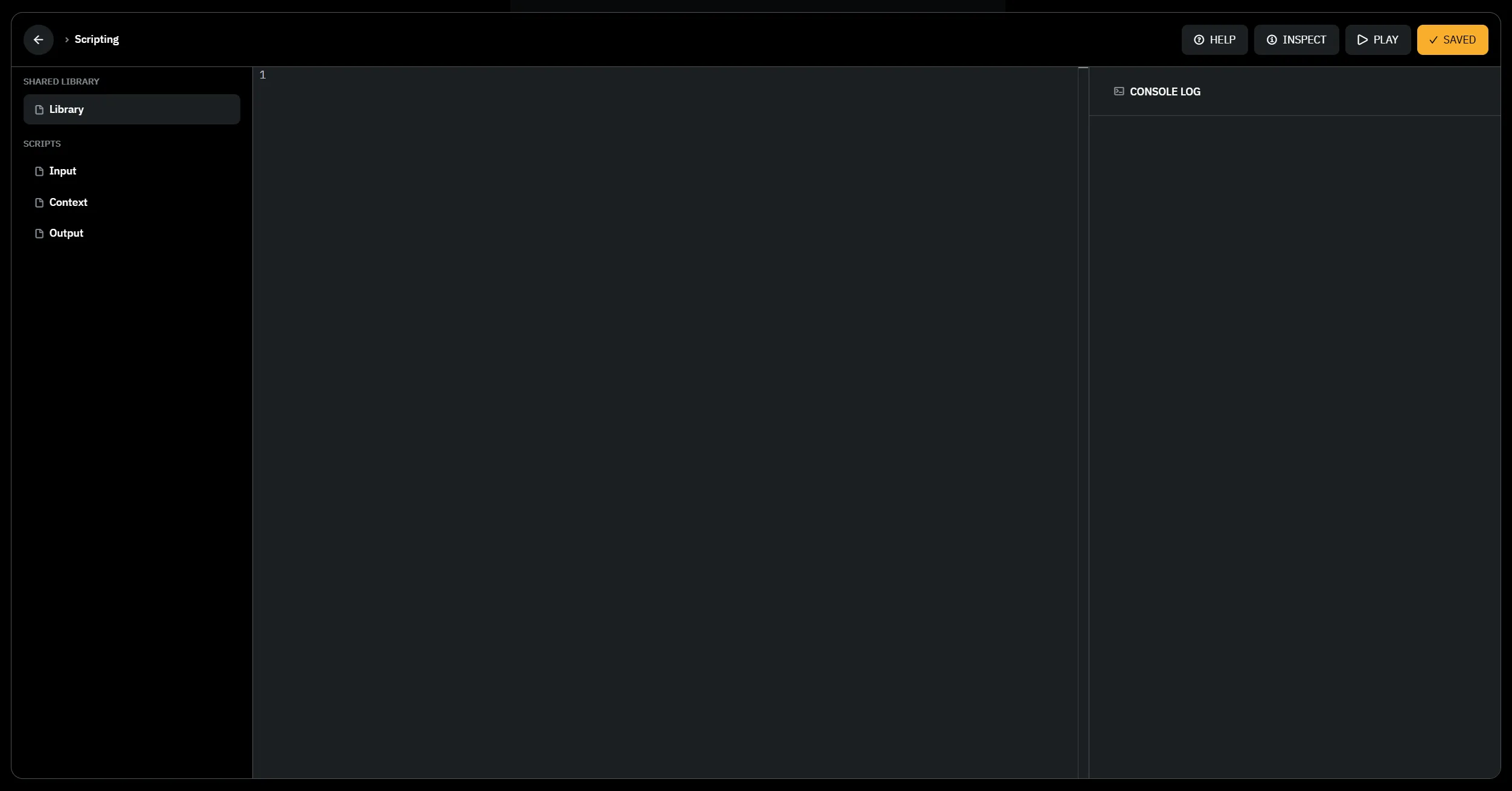
Along the left side are the four script tabs. “Shared Library” has the “Library” script file, and “Scripts” contains each of the modifier scripts: Input, Output, and Context. “Shared Library” is the spot where most of our code tends to go, since it’s shared between the other three tabs.
We also have the Help, Inspect, Play, and Save buttons along the top, and the Console Log and Script Test on the left side. Help will take you to the scripting documentation, inspect opens a context viewer (expires after 15 minutes, only works on your own scenarios), play will take you to the scenario page, and save will save your scripts to the scenario.
##Hook Types
The three spots you can get involved in the platform’s behavior are called hooks. Input, Output, and Context each do something different and are useful in different ways.
###Input Hook
The input hook is used to read and modify the player’s input. The dice roll script I mentioned earlier uses this to look for “try” or similar words in the player’s input, and add a dice roll result to the end of it. For non-continue player actions, this is the hook that runs first.
###Context Hook
Next in the execution process is the context hook. This runs every turn before the AI does anything, and determines what the AI sees.
This hook is super useful for collecting information about the story’s contents and on compatible models, it can be used to give the AI specific instructions on how to behave. This is what enables cards like LewdLeah’s Inner Self and Auto Cards; an instruction is added to tell the AI to describe a concept in the story (for Auto Cards) and loops until enough content is in the card, or the AI is told to pretend to be a character and inject thoughts in a specific format (for Inner Self).
###Output Hook
While the Context hook is the most useful for giving the AI instructions, correcting its output can be useful as well. That’s what the Output hook is for. Some scenarios use this to entirely overwrite the AI’s output with a specific message, like to present stat blocks. Several people use this to write scripts that enforce specific rules, like proper line breaks, or replacing cliche names with more diverse ones.
##Global State
Scripts work on a couple pieces of effectively global state which can be used to access nearly everything about the story and the adventure. A more full view of these can be found here, which also conveniently can be passed to an LLM to make it more effective at working with scripts.
###text
The text sent to the current hook. In an Input hook, this is the player’s input. In an Output hook, this is the AI’s output. In a Context hook, this is the context that the AI will see.
Note, this is after any processing. So for example, if I type “I go to the store” as a Do action, the text will be processed into second or third person to say “You go to the store” before it’s passed to the script.
###history
The history of the story so far, including the turn’s text and the type. The
type can be one of start, continue, do, say, story, or see. These
match with their corresponding player actions, except for start which is the
initial story start.
###storyCards
The story cards in the adventure.
###state
Persistent information, as well as memory which allows you to access the Plot
Essentials (state.memory.context), Author’s Note (state.memory.authorsNote),
and frontMemory which is added to the very end of the context.
###info
Contains some basic information about the adventure:
characterNamesfor the characters in a multiplayer adventureactionCountto track the number of actions taken
In the Context hook, it also includes:
maxChars, an estimate of how long the context is allowed to bememoryLengthwhich is the number of characters in the model context fromstate.memoryuseCacheEfficientwhich is a boolean indicating whether the model is cache efficientstoryModelwhich is information about the model currently being used, likenameandversion.
##Provided Functions
Some functions are also provided by default to help with scripting. These are
addStoryCard, removeStoryCard, log, and updateStoryCard. Here are what
these look like, as extracted from the scripting sandbox:
###addStoryCard
Adds a new story card to the adventure.
Creates a card with a random ID and pushes it to the storyCards array. The card
will be triggered when its keys match content in the recent story. The entry
field is what gets injected into the “World Lore” section of context.
function addStoryCard(
  keys,
  entry,
  type = 'Custom',
  name = keys,
  notes = '',
  options
) {
  const { returnCard = false } = options ?? {};
  storyCards.push({
    id: Math.floor(Math.random() * 1000000000).toString(),
    keys,
    entry,
    type,
    title: name,
    description: notes
  });
  if (returnCard) {
    return storyCards[storyCards.length - 1];
  } else {
    return storyCards.length;
  }
}###removeStoryCard
Removes a story card from the adventure.
Uses splice to remove the card at the specified index. Throws an error if the card doesn’t exist at the specified index. Use with caution as indices may shift when cards are added/removed.
function removeStoryCard(index) {
  if (storyCards[index]) {
    storyCards.splice(index, 1);
  } else {
    throw new Error(
      `Story card not found at index ${index} in removeStoryCard`
    );
  }
}###updateStoryCard
Updates an existing story card. Replaces the card at the specified index while preserving the id. Optional parameters (type, name notes) preserve existing values if not provided. Throws an error if the card does not exist at the specified index.
function updateStoryCard(index, keys, entry, type, name, notes) {
  const existing = storyCards[index]
  if (existing) {
    storyCards[index] = {
      id: existing.id,
      keys,
      entry,
      type: type ?? existing.type,
      title: name ?? existing.title,
      description: notes ?? existing.description
    }
  } else {
    throw new Error(
      `Story card not found at index ${index} in updateStoryCard`
    )
  }
}##The Modifier Function
Okay, that’s a lot about the information that hooks have available. Let’s take a look at where we use that information.
Hooks work on the idea of a modifier function. It takes in some state, and mutates that state. For example, one way of writing the modifier function looks like this:
// Simple no-op modifier function
const modifier = ({ text }) => {
    text = text + " [Modified Content]";
    return { text };
}

modifier(text);
This modifier function takes in the text state, and returns the modified text
state. This one is pretty simple, but it’s nice because it captures the text as
a part of its function context, so doesn’t risk accidentally modifying the
global text. We intentionally tell it to do that by calling modifier(text) at
the end.
You’ll also sometimes see ones like this, that modify the text state as a side
effect of the function. This is a bit more dangerous, but makes sense for
heavy scripts like InnerSelf that do a lot of work, and want to run before
anything else.
// In shared library
const Modifier = (hook) => {
    if (hook === "input") {
        text = text + " [Modified Content]";
    }
}

// In input script:
Modifier("input");##A Worked Example
Let’s take a look at a worked example of a script. This one will be super simple, one based on PoisonTea’s Dice Roll Script. First, we’ll want to add some details to the Shared Library. We’ll start by creating a function that captures all of the details of the script. This isn’t required, but it helps the script to play nice with other scripts and not risk clobbering other scripts’ hooks or internal state.
const DiceRoll = (function() {
    return {
        Hooks: {
            Input: (text) => { return text; },
            Output: (text) => { return text; },
            Context: (text) => { return text; },
        }
    }
}Next, let’s add a function to detect if the player is trying to do something. The way I’d do this is to first open up the Input hook, and log what we get when the player does something.
// In the Input tab
const modifier = ({ text }) => {
    log(text);
    return { text };
}

modifier(text);
I’ll also open up the adventure in another tab and run an action like “I go to the store”. Then I’ll check the console output and see what we get:
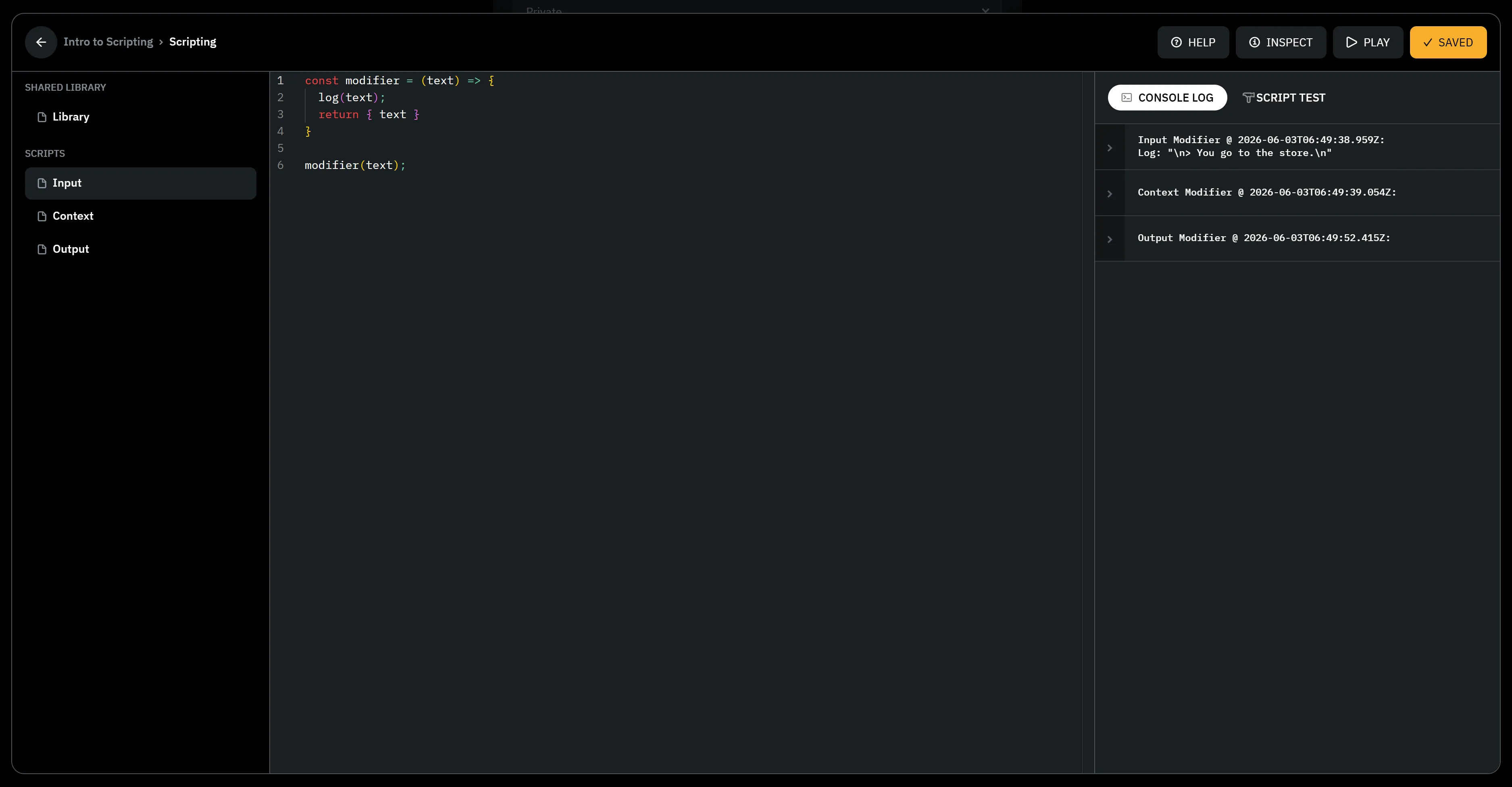
So, it looks like we get this:
\n> You go to the store.\nThat means a couple things. I probably want to look for “You try” or “You attempt” at the beginning of the text. So let me write a function that does that in my script, and log the result to the console:
const DiceRoll = (function() {
    const attemptWords = ["try", "attempt"];
    const attemptUnion = attemptWords.join("|");
    const attemptRegex = new RegExp(
      `> (You (${attemptUnion})[^.?!\\n]*[.?!]?)`,
      "i"
    );

    function isDiceRoll(text) {
        return attemptRegex.test(text);
    }

    return {
        Hooks: {
            Input: (text) => {
              log(`was dice roll: ${isDiceRoll(text)}`);
              return text;
            },
            Output: (text) => { return text; },
            Context: (text) => { return text; },
        }
    }
})();
Now I’ll hook this up in the Input script:
// In the Input tab
const modifier = ({ text }) => {
  text = DiceRoll.Hooks.Input(text);
  return { text };
}

modifier(text);
And give this a try by running an action like “I try to go to the store”, then checking the console output:
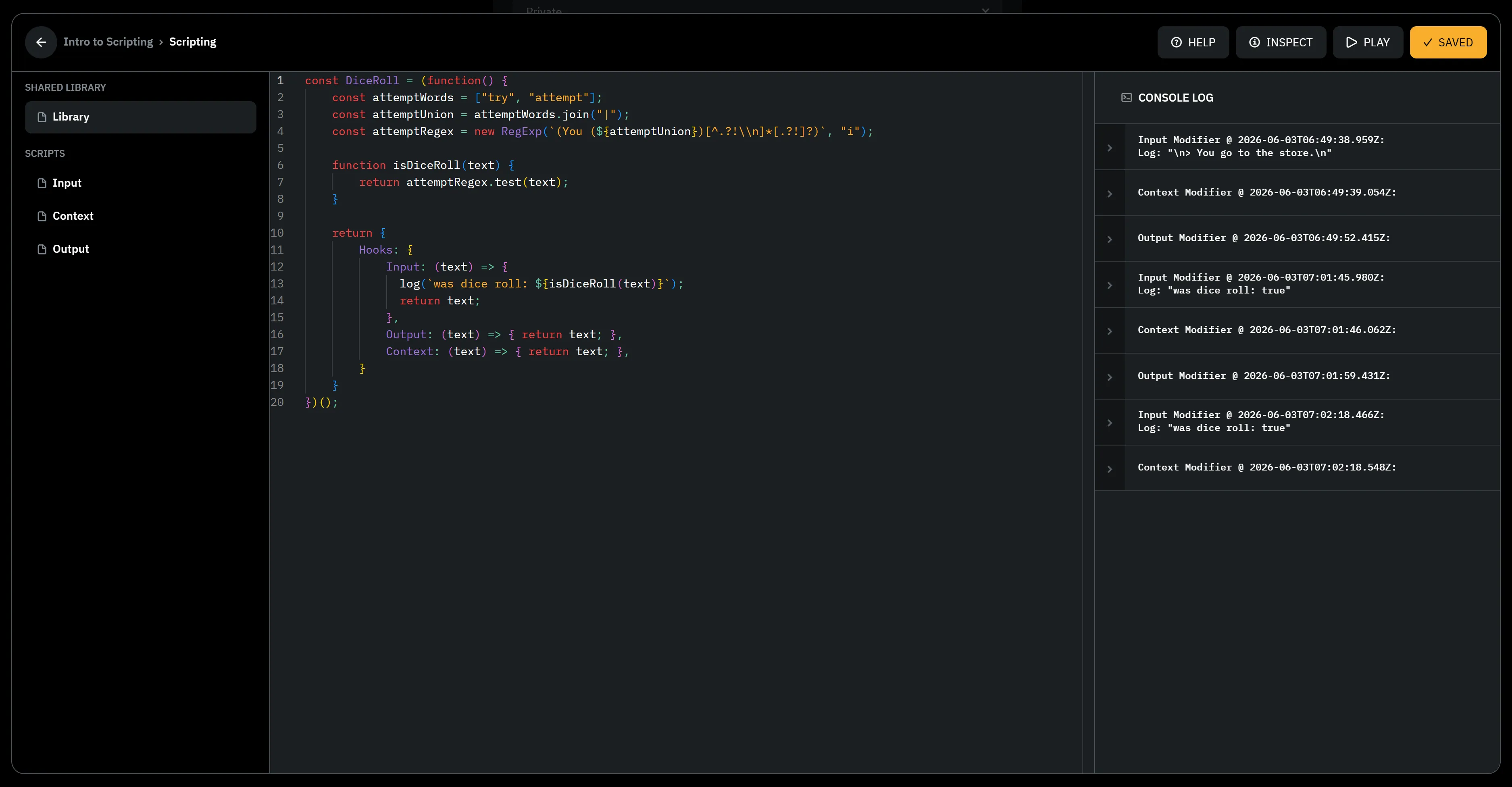
So, it looks like we get this:
was dice roll: trueThat means our function worked! Now, let’s add a function to roll the dice and add the result to the end of the text. We’ll use a simple function that rolls a dice and returns the result.
const DiceRoll = (function() {
    const attemptWords = ["try", "attempt"];
    const attemptUnion = attemptWords.join("|");
    const attemptRegex = new RegExp(
      `> (You (${attemptUnion})[^.?!\\n]*[.?!]?)`,
      "i"
    );

    function isDiceRoll(text) {
        return attemptRegex.test(text);
    }

    function getRollResult() {
      const result = (Math.floor(Math.random() * 20) + 1);
      if (result == 20) {
        return "Critical Success!";
      }
      if (result >= 10) {
        return "Success!";
      }
      if (result >= 5) {
        return "Partial Success!";
      }
      return "Failure!";
    }

    return {
        Hooks: {
            Input: (text) => {
              log(`was dice roll: ${isDiceRoll(text)}`);
              if (isDiceRoll(text)) {
                return text + ` [🎲 Dice Roll: ${getRollResult()}]`;
              }
              return text;
            },
            Output: (text) => { return text; },
            Context: (text) => { return text; },
        }
    }
})();
Let’s give this a test by running an action like “I try to go to the store”, then seeing if we get anything added onto that action.
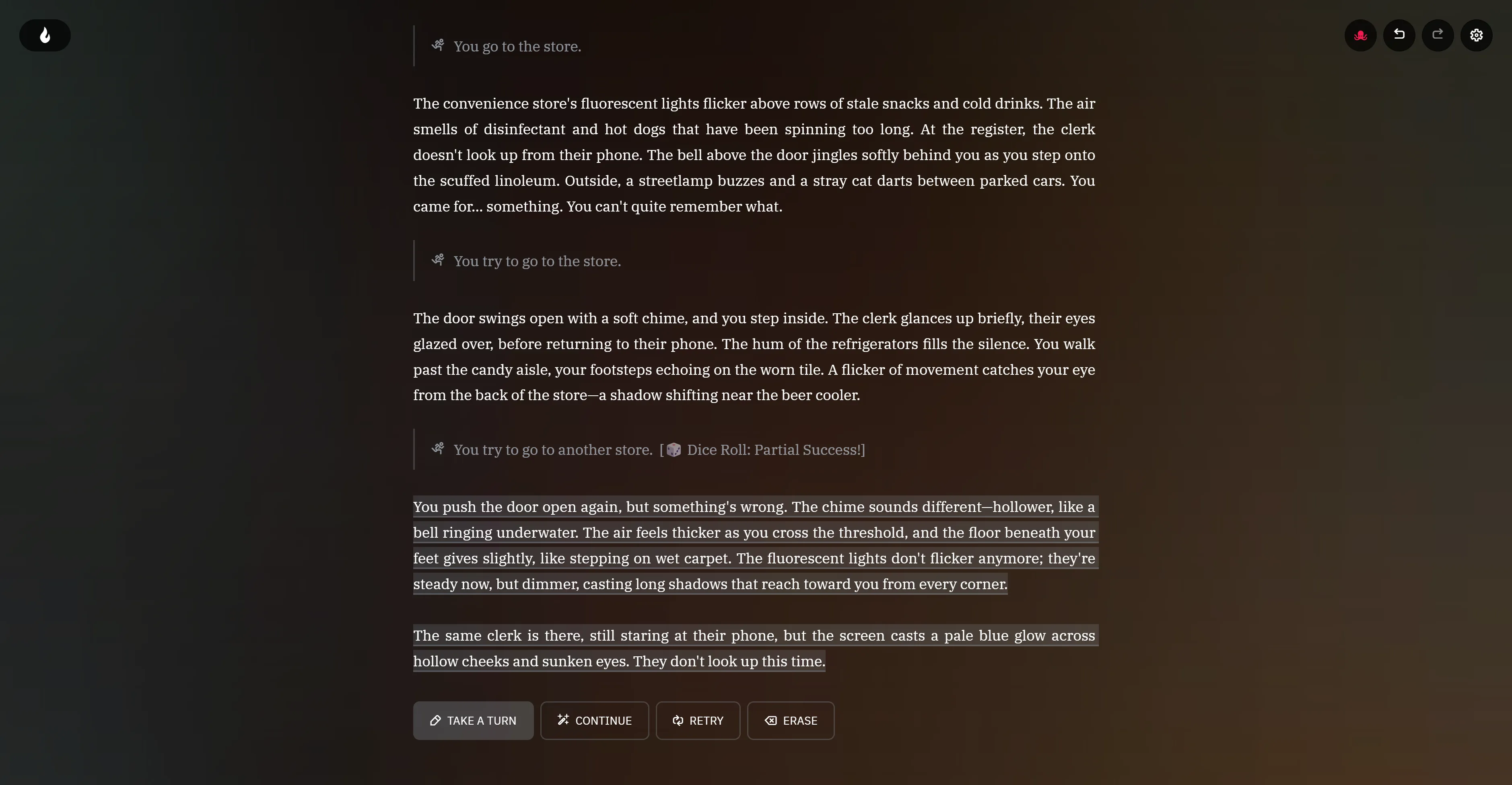
So, it looks like we get this:
You try to go to the store. [🎲 Dice Roll: Partial Success!]This is just touching the surface of what you can do with scripting. In my
next post, I’d like to cover
using story cards to configure your script’s behavior by adding modifier words
to this script. If this was useful to you please let me know! I’m worldsmythe_
on the AI Dungeon Discord.